Account & Billing
Invoices, discount codes, DPA, payments and account management at fluss.ai.
Last updated: 2026-08-17
Everything about managing your fluss.ai account, billing and legal documents.
Invoices
Change invoice details
To update company name, address or VAT ID on invoices:
- Go to Account → Customer Portal
- Click on "Payments"
- Select "Update invoice"
- Enter your complete company details
Changes apply to future invoices. Existing invoices can be corrected once upon request.
Download invoices
All invoices can be found in the customer portal:
- Account → Customer Portal
- View payment history
- Download PDF
Change payment method
- Open Customer Portal
- Payment method → Edit
- Add new card or SEPA direct debit
Plans & Pricing
Plan Overview
| Feature | Starter | Basic | Pro |
|---|---|---|---|
| Flows | 1 | 3 | Unlimited |
| Leads | Unlimited | Unlimited | Unlimited |
| Automatic valuation | - | ✓ | ✓ |
| Email to lead | - | ✓ | ✓ |
| SMS | - | ✓ | ✓ |
| n8n Integration | - | - | ✓ |
| Custom Domain | - | - | ✓ |
What does "1 Flow per website" mean?
A Flow can be embedded on one domain with any number of subpages.
Example: You can embed the Flow on all these pages:
my-company.com/valuationmy-company.com/contactmy-company.com/landing/summer
This counts as 1 website.
Change plan
Upgrade or downgrade possible at any time:
- Account → Manage subscription
- Select new plan
- Change is prorated
Redeem a discount code
Discount and partner codes are entered in the checkout window, not in your account.
- On Pricing, click "Subscribe" on the plan you want
- The checkout window shows the order summary on the left
- Click "Add discount" directly below the subtotal
- Enter the code and confirm — the reduction appears in the summary straight away
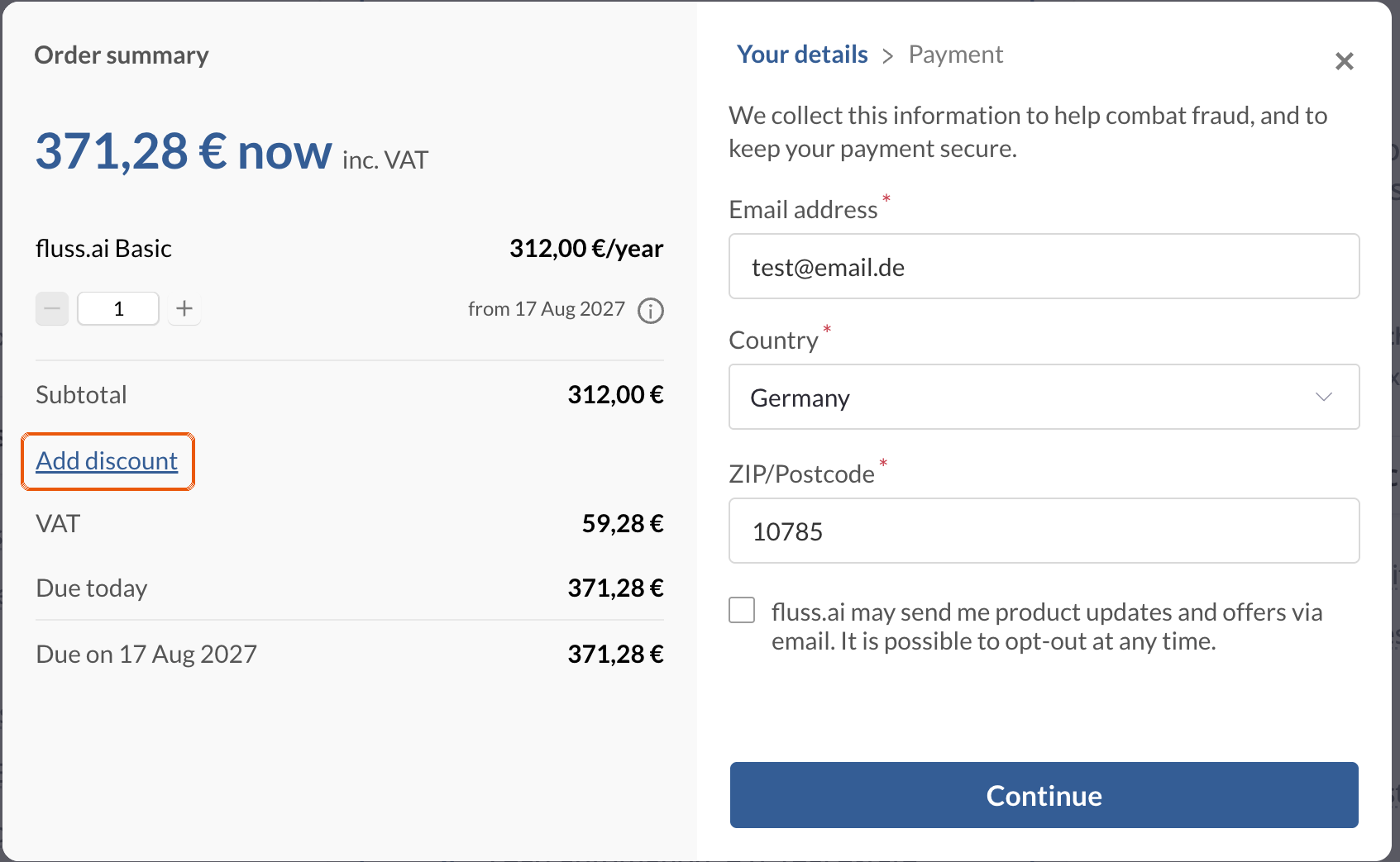
The link is easy to miss: it is small, blue and sits directly below the subtotal.
The code has to be redeemed before you complete the purchase. A completed invoice cannot be changed afterwards. If you forgot the code, get in touch via chat.
DPA (Data Processing Agreement)
Request DPA
For GDPR compliance, you can request a DPA:
- Contact support via chat or email
- Provide company name and contact person
- DPA will be created and sent (PDF)
DPA Contents
The DPA regulates:
- Type of processed data (lead data, contact information)
- Purpose of processing (lead generation)
- Sub-processors (Supabase, Vercel, Value AG)
- Technical and organizational measures
Account Settings
Change email address
- Account → Profile
- Update email address
- Confirmation via email
Change password
- Account → Security
- Set new password
Delete account
For deletion requests:
- Contact support
- All data will be deleted in compliance with GDPR
- Active subscription will be cancelled
After deletion, data cannot be recovered. Export important leads beforehand.
Frequently Asked Questions
Is there a free trial?
Yes, you can try fluss.ai for free. The trial includes the full feature set.
What happens after cancellation?
- Your data remains for a transition period
- You can export leads
- Data is deleted after expiration
Can I pause instead of cancel?
Contact support for individual solutions for temporary pauses.